How to Draw an Xbox Series X
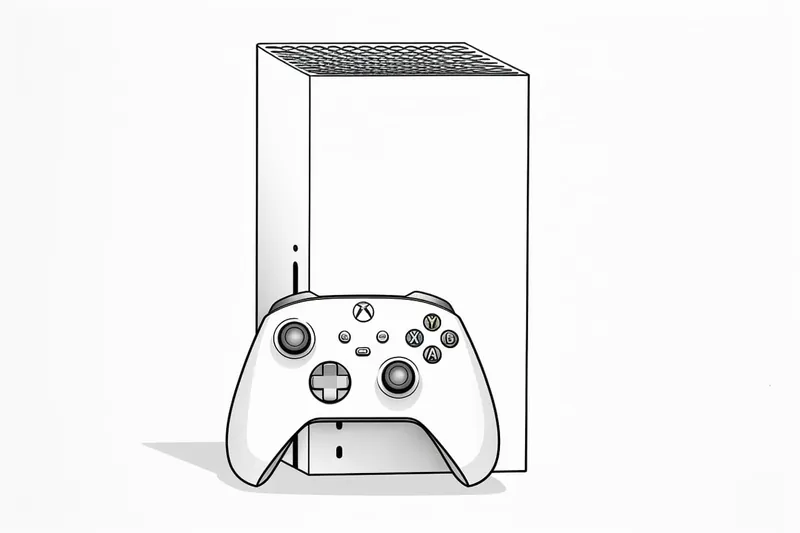
Learn how to draw an Xbox Series X with this step-by-step tutorial. Capture the sleek design of this gaming console and create an accurate representation.
Materials You'll Need
- Pencil
- Paper
- Eraser
The Xbox Series X stands as one of the most iconic gaming consoles of our time, known for its bold, minimalist design and powerful performance. Its distinctive rectangular shape, clean edges, and unique ventilation pattern make it a visually striking subject to draw. Whether you're a passionate gamer wanting to showcase your love for the console, or an artist seeking to practice drawing geometric forms and perspective, learning how to draw an Xbox Series X is both a fun and rewarding challenge. The console's design not only represents modern technology but also offers a perfect exercise in capturing subtle details and clean lines in your artwork.
This tutorial is suitable for artists of all skill levels, from beginners who are just learning to use rulers and basic shading techniques, to more advanced illustrators interested in refining their ability to render reflective surfaces and three-dimensional objects. You'll be guided step-by-step through the process, from sketching the basic form to adding the finer touches that bring your drawing to life. Along the way, you'll get to practice essential drawing skills such as using perspective, maintaining proportions, and working with shading to create depth. By following this guide on how to draw an Xbox Series X, you'll not only improve your technical skills but also create a piece of art that reflects your personal interests.
Don't worry if you're new to drawing or if this is your first time tackling a technological subject—this tutorial breaks down each step in a clear and approachable way. All you'll need are some basic drawing tools and a willingness to experiment and have fun. So grab your pencils, get comfortable, and let's dive into the process of drawing the Xbox Series X together. With a bit of patience and practice, you'll be amazed at what you can create!
Materials Required
Before we dive into the drawing process, let's ensure you have all the necessary materials to complete this tutorial. Here's a list of what you'll need:
- A blank sheet of paper
- Pencils (HB and 2B)
- Eraser
- Ruler
- Compass (optional)
- Colored pencils or markers (optional)
Now that you have your materials ready, let's begin drawing the Xbox Series X.
Step 1: Outline the Basic Shape
Start by drawing a horizontal line slightly above the center of your paper. This line will serve as a guide to help you maintain proportion throughout the drawing. Next, draw a vertical line cutting through the horizontal line, extending downwards. These lines will create the basic frame of the Xbox Series X.
Step 2: Draw the Console Body
Using the shape of a rectangular prism as a reference, draw the outline of the console body around the guiding lines. The Xbox Series X has a rectangular shape with smooth edges. Pay close attention to the proportions and angles of the console body to ensure accuracy.
Step 3: Add Details to the Console Body
Now that the basic shape is in place, let's start adding some details to make it look like an Xbox Series X. Draw the ventilation holes on the top of the console by creating a grid of small squares. These squares should be evenly spaced and cover the entire top surface of the console body.
Step 4: Outline the Front Panel
The front panel of the Xbox Series X has a concave shape on one side and a set of vertical lines on the other. Start by drawing a curved line that connects the top and bottom edges of the console body on the left side. Then, draw a vertical line on the right side, slightly away from the edge. Add parallel lines to create a textured effect on the front panel.
Step 5: Add the Xbox Logo
The Xbox logo is an essential part of the console's design. To draw it, start by drawing a circle near the bottom of the front panel. Within the circle, draw an elongated "X" shape, ensuring that the lines intersect at the center of the circle. Once you have the basic shape, refine the lines to make them smooth and clean.
Step 6: Draw the Ports and Buttons
The Xbox Series X features various ports and buttons on its back and front panels. Using reference images or your knowledge of the console, draw the necessary details. For example, draw the USB ports, HDMI port, power button, and eject button in their respective positions on the console body. Take your time to ensure the proportions and placement are accurate.
Step 7: Render the Shading and Texture
To add depth and realism to your drawing, it's time to render shading and texture. Start by identifying the areas that would naturally be in shadow. Use a darker pencil (2B) to lightly shade these areas. Gradually build up the shading, blending it smoothly with the lighter areas. Pay attention to the curved and textured surfaces to create a realistic effect.
Step 8: Add Optional Color
If you prefer to add color to your drawing, now is the time to do so. The Xbox Series X has a black exterior, but you can use colored pencils or markers to add highlights and shadows. Experiment with different shades to create a more vibrant representation of the console. Remember to blend the colors smoothly to achieve a polished look.
Tip: To create a precise and accurate drawing of the Xbox Series X, begin by using a ruler to establish the console's basic rectangular form, ensuring that your lines are straight and proportional. Once you have the outline, lightly sketch the grid pattern of the ventilation holes on the top using a pencil, as this will help maintain symmetry and uniformity; don't hesitate to measure the spacing to keep it consistent. When shading, pay close attention to the light source and use a blending stump to achieve smooth transitions, especially on the console's matte and glossy surfaces, which will add depth and realism to your drawing. Finally, consider using an eraser to create highlights, mimicking the reflective surfaces, and adding that extra touch of detail that brings your artwork to life. Remember, patience and practice are key, so take your time to refine each element!
Conclusion
Congratulations! You've successfully learned how to draw an Xbox Series X. By following these step-by-step instructions, you've created a realistic representation of this iconic gaming console. Keep practicing to refine your skills and explore other subjects. Enjoy the process of bringing your imagination to life on paper.
Fun Facts About Xbox Series X
- The Xbox Series X can play games at up to 120 frames per second, offering ultra-smooth gameplay for supported titles.
- It features a custom 1TB NVMe SSD, enabling lightning-fast load times and quick resume for multiple games.
- The Xbox Series X is backward compatible with thousands of Xbox One, Xbox 360, and original Xbox games.
- Its unique vertical design and large cooling fan help keep the console quiet and cool.
- The console supports hardware-accelerated DirectX Raytracing for realistic lighting and reflections.
- Xbox Series X was released on November 10, 2020, alongside the smaller Series S.
- It is the most powerful Xbox ever made, with 12 teraflops of GPU power.
- The top of the console features a green accent under the vent holes, creating a glowing effect.
Suggestions for Scenes and Settings for an Xbox Series X Drawings
- The Xbox Series X displayed in a futuristic gaming setup with neon lighting and floating holographic screens.
- The console surrounded by classic and modern Xbox controllers, highlighting the evolution of gaming hardware.
- An exploded view of the Xbox Series X, showcasing its internal components like the cooling fan, processor, and storage drive.
- The Xbox Series X as the centerpiece of a cozy living room, with shelves of video games and gaming memorabilia in the background.
- A stylized, comic-book-inspired scene of the console transforming into a robotic guardian defending a digital city.
- The Xbox Series X drawn in a surreal, oversized scale as a skyscraper in a city made of other gaming devices.
- A dynamic scene of the console launching energy beams, hinting at the power within and referencing its next-gen performance.
- The Xbox Series X depicted as a treasure chest being discovered by adventurous gamers in a fantasy landscape.
- A minimalist, architectural illustration focusing on the console's geometric lines, shadows, and reflections.
- The console in an outdoor setting, such as a park or rooftop, being used for a social gaming night under string lights.